
Python and Django let you build secure, real-world websites and AI-powered apps faster than most frameworks. This guide explains what Django is, what you will build, a 180-day roadmap, and how to turn web development skills into freelance dollar income.
Table of contents
Table of Contents
A shop owner in Faisalabad wants an online order system. A school wants a student portal. A startup abroad wants a dashboard with an AI chatbot inside it. None of them wants a template. They want a working web application, and they will pay a developer who can build one.
That developer often uses Python and Django. This guide explains what Django is, why it is a smart choice in 2027, what you can build, and how to go from beginner to your first paid project in 90 days.
What Is Django?
Django is a free, open-source web framework written in Python. Think of it as a fully equipped workshop. Instead of making every tool yourself, you get them ready to use:
User login and signup built in.
An admin panel to manage your data without extra coding.
A database layer (ORM) so you work with Python instead of raw SQL.
Security protections against common attacks like SQL injection and cross-site scripting.
URL routing, forms and templates to build complete pages quickly.
Django’s own tagline says it well:
“The web framework for perfectionists with deadlines.”
— Django Project
It is also proven at scale. Large products such as Instagram, Pinterest and Mozilla have used Django in their stack.
Why Python + Django Makes Sense in 2027
Stack Overflow’s 2025 Developer Survey showed Python’s usage rising about 7 percentage points in one year, the biggest jump among major languages, driven by AI and data work.
The same survey found around 84% of developers use or plan to use AI tools, and Python is the main language of the AI world.
The World Economic Forum expects 39% of core job skills to change by 2030, with technology skills growing fastest.
Pakistan’s IT and IT-enabled services exports have passed $3.8 billion in a year, with freelancers and small teams a growing share.
The main advantage is simple. One language covers your website, your database logic and your AI features. A Django app can call an AI model, automate a workflow and show the result on a web page, all in Python.
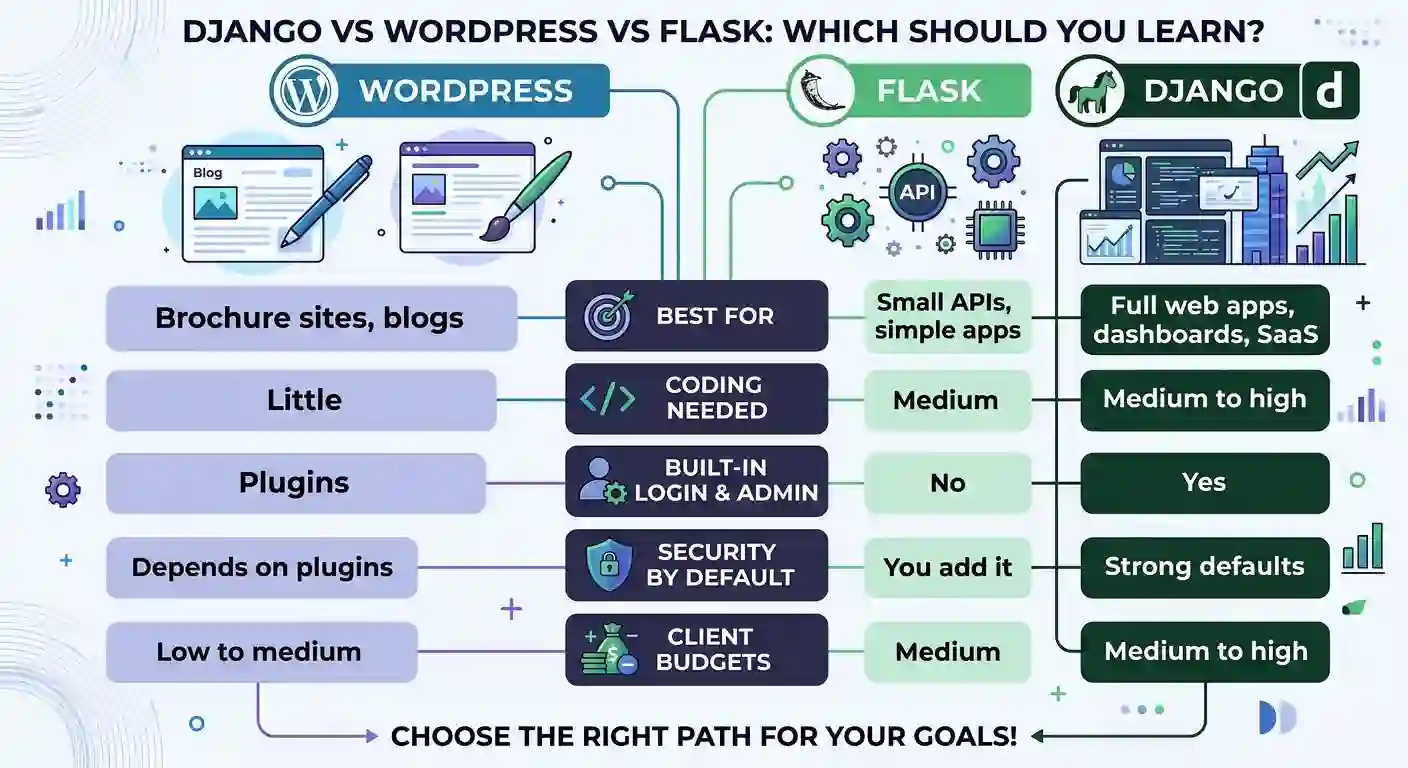
Django vs WordPress vs Flask: Which Should You Learn?
What Can You Build With Django?
School or academy portals with student login, fees and results.
Booking systems for clinics, salons and event halls.
Inventory and POS systems for shops, pharmacies and warehouses.
E-commerce stores with carts, orders and payments.
AI-powered apps such as chatbots, document summarisers and recommendation tools.
REST APIs that power mobile apps and other websites.
Many Faisalabad businesses still run on paper registers and Excel sheets. Each one is a possible client.
What You Learn in a Python & Django Course
A good course takes you from zero to a deployed project. Here is a sample outline:
Python foundations: variables, loops, functions, lists, dictionaries, files and errors.
Web basics: HTML, CSS and a little JavaScript, so you can build the front end.
Django core: projects, apps, URLs, views, templates and settings.
Databases: models, migrations, the admin panel and basic SQL.
Users and security: login, signup, permissions and safe form handling.
APIs: Django REST Framework, so mobile apps and other sites can use your data.
AI integration: add a chatbot or automation to your app.
Deployment: put your project online, with Git and GitHub for your portfolio.
Your 180-Day Roadmap to Django Developer
Days 1 to 30: Python and web basics
Practise Python daily in the free online compiler.
Build a simple HTML and CSS portfolio page.
Learn SQL basics: tables, INSERT and SELECT.
Goal: 20 small programs and one live page.
Days 31 to 60: Django fundamentals
Create your first Django project and admin panel.
Build a student list or a shop inventory app with login.
Learn Git and push every project to GitHub.
Goal: two working Django apps with a database.
Days 61 to 90: Real project, API and portfolio
Build one complete project, such as a clinic booking system.
Add a REST API and one AI feature.
Deploy it online and write a short case study.
Goal: one live project, one portfolio page, one freelancer profile.
Common Mistakes to Avoid
Following tutorials without building your own project. Clients ask what you built.
Skipping Python basics. Django is much harder if loops and functions confuse you.
Ignoring security. Never hard-code passwords or share secret keys on GitHub.
Copy-pasting AI code blindly. AI helps, but you must read, test and understand it.
Learning ten frameworks at once. Master Django first.
Learning alone. A teacher who reviews your code saves months of confusion.
“A compiler tells you it runs. A teacher tells you it’s good.”
— AI Computer Science Academy
How to Earn From Python & Django Skills
Custom web apps for local businesses, schools and clinics.
Admin dashboards and management systems replacing Excel and paper.
API development for mobile apps and startups.
AI chatbot and automation add-ons for existing websites.
Maintenance retainers: monthly fees for updates and support.
Remote work for international clients through freelance platforms.
Income depends on effort, portfolio quality and consistent outreach, so treat any earning figure as a possibility, not a promise.
Who Should Join?
Students who want a practical skill alongside their degree.
Job holders who want a second income skill through evening batches.
Freelancers who want to move from simple sites to higher-paying custom apps.
Business owners who want to build their own management system.
Frequently Asked Questions
Do I need coding experience for Django?
No. You start with Python basics and build up. Practising daily in a free online compiler helps a lot.
How long does it take to learn Django?
Most learners can build a basic working project in about 60 to 90 days of steady practice.
Is Django better than WordPress?
They serve different needs. WordPress is faster for simple sites. Django is better for custom, data-driven applications.
Can I get a job or freelance work with Django?
Yes, but results depend on your portfolio, skills and outreach. Employers and clients care most about projects you have built.
Can I learn while working full time?
Yes. Evening and weekend batches are designed for this.
Final Thoughts: Build Something Real
The people who earn from web development aren’t the ones who watched the most videos. They are the ones who built, broke, fixed and shipped real projects.
Start this week. Open the free lab, write your first Python program, and tomorrow write another. In 90 days, you could have a deployed Django project and a portfolio to show.
Ready to begin?
👉 Try the free coding lab and online compiler (no install, no signup)
👉 Join the Python & Django course at AI Computer Science Academy, Faisalabad
👉 Book a free counselling call to choose your path