
You don’t need an expensive laptop to learn coding. A free online compiler runs Python, C++, Java and SQL in your browser in seconds. This guide shows how to practise smarter, avoid beginner mistakes, and turn code into real income.
Table of contents
Table of Contents
Picture a student in Faisalabad who wants to learn Python. She has a phone, an unreliable connection and a shared family computer that is busy until night. The old advice says to download Python, install an editor, set up paths and fix errors before writing a single line. Most beginners quit during that setup, long before the real learning starts.
In 2027 that barrier is optional. A free online compiler lets you open a page, pick a language, type and press Run. This guide explains how online compilers work, why they are changing how Pakistan learns to code, and how to use one to go from beginner to your first paid project.
What Is an Online Compiler?
A compiler or interpreter turns the code you write into something a computer can run. Traditionally you installed it on your own machine. An online compiler does the same job inside your web browser, so there is nothing to download.
Modern browsers can run powerful engines directly, thanks to technologies like WebAssembly. That means your code can run instantly on your own device, without being sent to a server. On the AICS Academy compiler, Python, JavaScript, HTML/CSS, SQL, C and C++ run on full engines bundled with the site, while other languages run on a beginner-friendly teaching subset.
“Talk is cheap. Show me the code.”
— Linus Torvalds, creator of Linux
Learning to code works the same way. You can watch tutorials for months, but skills only grow when you type, run, fail and fix.
The Numbers Behind Browser-Based Coding
Stack Overflow’s 2025 Developer Survey found about 84% of developers use or plan to use AI tools, so the way people learn and write code keeps shifting toward instant, tool-assisted practice.
The same survey reported Python’s usage rising about 7 percentage points in a year, the biggest jump among major languages, driven by AI and data work.
GitHub’s Octoverse 2025 report showed TypeScript overtaking Python and JavaScript as the most-used language on the platform by contributors.
The World Economic Forum expects 39% of core job skills to change by 2030, with technology skills among the fastest growing.
Pakistan’s IT and IT-enabled services exports have passed $3.8 billion in a year, and freelancers and small teams are a growing part of that.
Demand for coding skills is rising. What holds back many learners is not talent, but access to a working setup.
Online Compiler vs Installing Software: An Honest Comparison
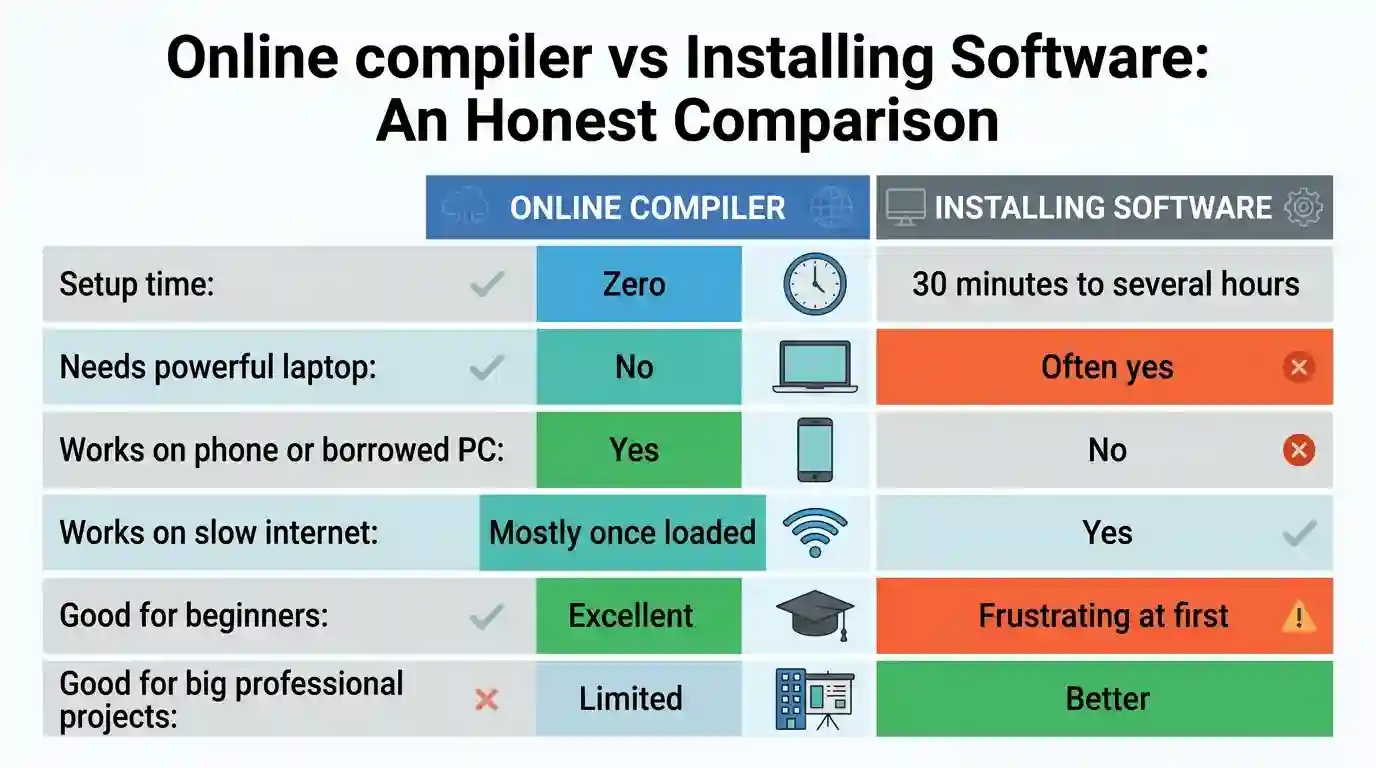
Both have a place. Use an online compiler to learn, practise and prototype. Move to a local setup later, when your projects grow and your skills are ready.
7 Reasons Online Compilers Are Perfect for Pakistani Learners
No expensive hardware. A basic phone or a lab PC is enough.
No installation errors. The number one reason beginners quit disappears.
Practise anywhere. At the shop, on the bus, or on a friend’s laptop at midnight.
Instant feedback. Seeing output in under a second keeps motivation high.
Privacy. On our compiler, your code stays in your browser. Nothing is uploaded and no account is needed.
Many languages in one place. Test Python, C++, SQL and Java before committing to a path.
Share and submit easily. One click copies a link to your exact code, or you can download the file with the right extension.
Which Language Should You Start With?
Choosing the first language causes more stress than it should. Use this quick guide:
Python: best for absolute beginners, AI, automation and data.
HTML, CSS and JavaScript: best if you want to build websites and see results visually.
SQL: best for jobs that work with data, reports and databases. Almost every business app uses it.
C and C++: best for understanding how computers work, and for exams and data structures.
Java, Kotlin and C#: best for banks, Android apps, games and enterprise jobs.
Swift: best if you dream of building iPhone apps.
R and PHP: best for statistics and server-side web work.
“Everybody in this country should learn how to program a computer, because it teaches you how to think.”
— Steve Jobs
If you are unsure, start with Python plus SQL. Together they cover automation, AI, data and backend work.
Your First 30 Days in an Online Compiler
Week 1: Meet the basics
Print messages, use variables and do simple arithmetic.
Write 10 tiny programs, such as a calculator or a greeting.
Goal: get comfortable pressing Run and reading errors.
Week 2: Make decisions and repeat
Practise if/else, loops and simple functions.
Build a fee calculator and a number-guessing game.
Goal: solve five small problems without copying.
Week 3: Work with data
Use lists and strings, then try SQL: create a table and run SELECT queries.
Build a small student list and filter it by course.
Goal: write 10 SQL queries from memory.
Week 4: Build and share
Combine what you know into one mini project.
Use the Share button to send your code link to a friend or teacher for feedback.
Goal: one finished project you can explain in two minutes.
How to Use AI Without Becoming Dependent on It
AI assistants can explain errors and suggest code, but beginners often misuse them by pasting answers without thinking. A better routine:
Try first. Spend at least 10 minutes on the problem yourself.
Ask for hints, not solutions. Say “explain why this line fails,” not “write the whole program.”
Re-type the answer. Do not copy and paste. Typing builds memory.
Break it on purpose. Change a line, predict the error, then run it.
Explain it back. If you can’t explain a line, you haven’t learned it yet.
“A compiler tells you it runs. A teacher tells you it’s good.”
— AI Computer Science Academy
That is why practice and guidance work best together.
Common Mistakes Beginners Make
Watching without typing. Tutorials feel productive, but only typed code builds skill.
Switching languages every week. Stay with one for at least 30 days.
Fearing red error messages. Errors are clues. Read them line by line.
Never saving projects. Download your files and build a portfolio on GitHub.
Learning alone for too long. A teacher who reads your code will spot habits you can’t see.
Expecting overnight results. Steady daily practice beats a long weekend of cramming.
Turning Practice Into Income
Coding skill becomes money when you package it. Here are realistic paths:
Website building for local shops, schools and clinics.
Automation scripts that save businesses time on reports and spreadsheets.
SQL and data cleaning for small companies that still manage records in Excel.
Freelance profiles offering small fixes, tools and tutoring.
Teaching beginners once you have walked the path yourself.
Income depends on effort, portfolio quality and consistent outreach, so treat any earning figure as a possibility, not a promise.
Who Should Start Today?
Students unsure which field to choose, who want to test coding before picking a degree.
Job holders who want a second skill without leaving work.
Parents who want safe, free practice for their children.
Freelancers who want a technical edge for higher-paying work.
Frequently Asked Questions
Is the online compiler really free?
Yes. There is no signup, no payment and no limit on how often you run code.
Do I need to install anything?
No. Everything runs in your browser on a phone, laptop or lab computer.
Is my code private?
Your code is not uploaded. It stays in your browser and is saved only on your device.
Why do some languages say a line is unsupported?
Java, Kotlin, C#, Swift, Rust, Ruby, R, PHP and TypeScript run on a beginner teaching subset. If a line falls outside it, the console tells you the exact line number instead of pretending it ran.
Can I learn coding without a laptop?
Yes. A phone with a browser is enough to start, though a keyboard makes longer practice easier.
What should I do after I finish the basics?
Build small projects, share them for feedback and join a class where a teacher reviews your code.
Final Thoughts: Start Before You Feel Ready
The biggest myth in coding is that you need the perfect laptop, the perfect course and the perfect moment. You don’t. You need a browser, ten minutes and the courage to type your first line.
Open the compiler today, pick a language and write something small. Break it, fix it and run it again. That loop is what turns beginners into developers.
Ready to begin?
👉 Try the free online compiler (15+ languages, no signup, no install)
👉 Join a coding or Agentic AI course at AI Computer Science Academy, Faisalabad
👉 Book a free counselling call to find the right path