
Watching coding tutorials feels like progress, but it rarely builds skill. A free interactive coding lab makes you type, run and fix real code. Learn how to escape tutorial hell, practise smarter and earn a certificate, all free.
Table of contents
Table of Contents
Be honest: how many coding tutorials have you watched? Ten? Fifty? And how many programs have you built from a blank screen, without pausing the video to copy the next line?
If the first number is much bigger than the second, you are in what developers call tutorial hell. The videos feel productive, the instructor makes everything look easy, and yet when you open an empty editor, your mind goes blank.
The fix is simple, and it’s free: a coding lab, a place where you write, run, break and repair real code from day one. This coding lab guide explains why labs beat videos, how to use one properly, and how to turn free practice into a certificate and a paying skill.
What Is a Free Coding Lab?
A coding lab is an interactive workspace where you learn by doing. Instead of watching someone else’s screen, you work on your own. A good lab gives you:
A real editor where you type and run code instantly.
Instant feedback so you see your output and errors in seconds.
Guided practice with small challenges that build step by step.
Checkpoint quizzes that confirm you understood, not just copied.
A final exam and certificate that prove your skill to employers and clients.
At AI Computer Science Academy, the free lab covers Python, C++, SQL, HTML, CSS and JavaScript, plus 15+ compilers that run in your browser with no install. You can start instantly without an account, then create a free account to save progress, unlock quizzes, attempt the final exam and earn a course certificate.
“For the things we have to learn before we can do them, we learn by doing them.”
— Aristotle, Nicomachean Ethics
Twenty-three centuries later, that is still the best coding advice.
Why Tutorials Alone Don’t Work
Tutorials aren’t bad. They are just incomplete. Here is what usually goes wrong:
You feel like you understand. Watching code being written creates an illusion of skill. Typing it yourself exposes the gaps.
You never face the blank page. Real work starts with an empty file, not a finished example.
Errors never happen to you. In videos, the instructor has already fixed the bugs. In real life, debugging is half the job.
There is no checkpoint. Nobody tests whether you actually learned.
Motivation fades. Without small wins, most learners quit by week three.
The data backs this up. Research on large online courses (MOOCs) by Katy Jordan found average completion rates of only around 15%, which means most people who start a video-only course never finish. Interactive, project-based learning keeps people engaged because every few minutes they achieve something real.
“What I cannot create, I do not understand.”
— Richard Feynman, physicist
Replace “create” with “code” and you have the philosophy behind every good coding lab.
The Numbers Behind Learning to Code in 2027
The World Economic Forum expects 39% of core job skills to change by 2030, with AI, data and technology skills growing fastest.
Stack Overflow’s 2025 Developer Survey found about 84% of developers use or plan to use AI tools, and Python’s usage rose about 7 percentage points in a single year.
Pakistan’s IT and IT-enabled services exports have passed $3.8 billion in a year, and freelancers and small teams are a growing part of that.
Employers increasingly practise skills-based hiring: they ask what you built and whether you can show it, not only which degree you hold.
The opportunity is real. What stops most people is not intelligence. It is a lack of structured, hands-on practice they can afford.
Free Coding Lab vs Paid Courses vs YouTube
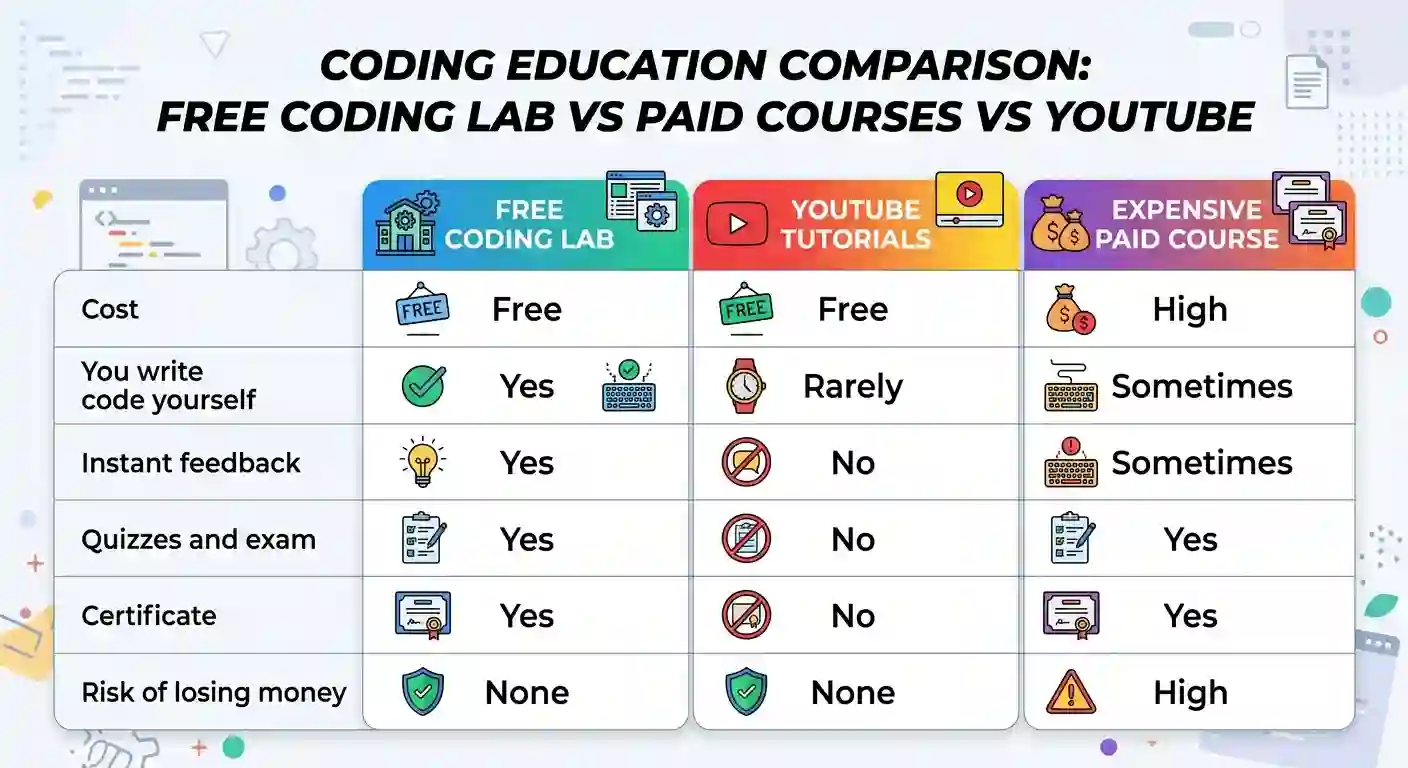
The smartest approach is to test before you pay. Use the free lab to find out whether you enjoy coding. If you do, you can move to a class with confidence. If you don’t, you’ve lost nothing.
6 Things a Good Free Coding Lab Should Give You
Zero setup. If you have to install five things first, it isn’t beginner-friendly.
Many languages. You should be able to try Python, SQL, C++ and web code before choosing a path.
Honest feedback. Clear error messages with line numbers, not silent failures.
A learning path. Small steps in order, not a random pile of exercises.
Proof of progress. Saved progress, quizzes and a certificate that you can show.
Privacy. Your code shouldn’t be sold or shared without your permission.
How to Use the Lab Properly: The 20-Minute Daily Method
Consistency beats intensity. Twenty focused minutes a day will take you further than a six-hour weekend binge.
5 minutes: warm up. Re-type a program you wrote yesterday from memory.
10 minutes: new challenge. Solve one new problem. Do not look at the solution for at least 5 minutes.
5 minutes: break and fix. Change one line on purpose, predict the error, then run it.
Then end each session with one sentence: “Today I learned ___.” Writing it down makes the lesson stick.
Your 30-Day Free Coding Lab Roadmap
Week 1: First lines of code
Print messages, use variables and do simple maths in Python.
Write 10 tiny programs, such as a greeting, a calculator and a fee converter.
Goal: be comfortable pressing Run and reading errors.
Week 2: Decisions and loops
Practise if/else, loops and functions.
Build a number-guessing game and a marks-grade calculator.
Goal: solve five problems without looking at an answer.
Week 3: Data and the web
Learn SQL basics: create a table, insert rows and run SELECT queries.
Build a simple HTML and CSS page about yourself.
Goal: write 10 SQL queries and publish one small page.
Week 4: Quizzes, project and certificate
Take the checkpoint quizzes to find weak spots, then revise them.
Combine your skills into one mini project and explain it in two minutes.
Attempt the final exam to earn your course certificate.
Goal: one project, one passed exam, one certificate.
Which Course Should You Try First?
Python: best for beginners, AI, automation and data.
SQL: best for office jobs, reports and business data.
HTML, CSS and JavaScript: best if you want to build websites and see results visually.
C++: best for university exams, logic building and data structures.
Not sure? Start with Python plus SQL for the first two weeks, then decide.
Common Mistakes to Avoid
Copy-pasting solutions. If you can’t explain a line, you haven’t learned it.
Jumping between languages. Stay with one for at least 30 days.
Skipping the quizzes. They show exactly what you misunderstood.
Never finishing a project. Small finished projects beat big abandoned ones.
Practising only when you feel motivated. Make it a daily habit, not a mood.
Learning without feedback. A teacher who reads your code spots habits you can’t see.
“A compiler tells you it runs. A teacher tells you it’s good.”
— AI Computer Science Academy
That is why the lab works best as the first step, followed by guidance from a real teacher.
From Free Practice to Real Income
Coding skill turns into money when you package it. Realistic paths include:
Simple websites for local shops, schools and clinics.
Automation scripts that save businesses hours on reports and spreadsheets.
SQL and data cleaning for companies that still run on Excel.
Freelance profiles offering small fixes, tools and tutoring.
Agentic AI and automation work once your Python and logic are strong.
Income depends on effort, portfolio quality and consistent outreach, so treat any earning figure as a possibility, not a promise.
Who Should Start Today?
Students who want to test IT before choosing a degree.
Job holders who want a second skill without quitting work.
Career switchers starting over who need a low-risk first step.
Parents who want safe, free, structured practice for their children.
Frequently Asked Questions
Is the coding lab really free?
Yes. You can start instantly with no account. The lab is free to use, and a free account saves your progress.
Do I need to create an account?
Not to start. Create a free account when you want to save progress, unlock checkpoint quizzes, attempt the final exam and earn a certificate.
Do I need experience?
No. The lab is designed for absolute beginners.
Which languages can I practise?
Python, C++, SQL, HTML, CSS and JavaScript, plus 15+ compilers in your browser.
Is the certificate useful?
It proves you completed the course and passed the exam. Combine it with real projects, because employers and clients trust what you built even more than what you studied.
Can I practise on my phone?
Yes, a phone browser is enough to begin, though a keyboard helps for longer sessions.
Final Thoughts: Stop Watching, Start Writing
Nobody learns to swim by watching videos of swimmers. Coding is the same. The only way out of tutorial hell is to write code, make mistakes and fix them, over and over, every day.
Open the free lab today. Pick one language, write one small program and press Run. Tomorrow, do it again. In 30 days, you will have something no tutorial can give you: proof that you can code.
Ready to start?
👉 Open the free coding lab (no experience, no install)
👉 Create a free account to save progress and earn your certificate
👉 Join a class at AI Computer Science Academy, Faisalabad for teacher-reviewed projects
👉 Book a free counselling call to choose the right path